 FinLens
Your shares and ETFs at the latest BSE close
FinLens rebuilds your equity holdings from Groww's stock order history, values them at BSE's official closing prices and keeps the profit or loss on every share you have sold.
- AES-256 encryption
- No bank passwords, no payments
- Two-step sign-in
- Available in India only
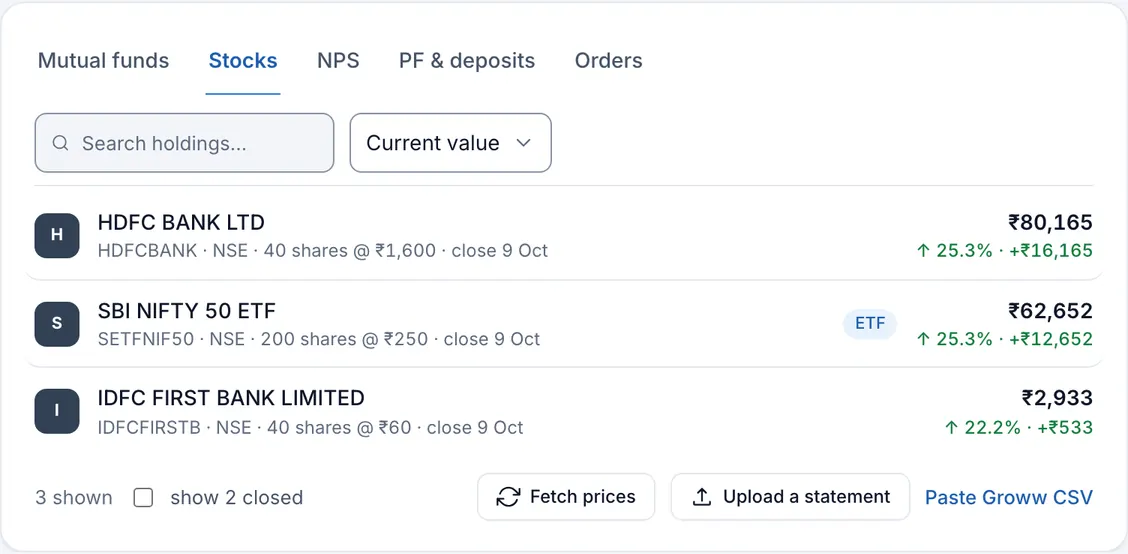
What the stock portfolio tracker shows
The Stocks tab on Investments lists every share and ETF you have traded: its symbol and exchange, the number of shares you hold at your average buying price, the date of the close used, the current value and your return in rupees and per cent. A position you have sold completely is marked Closed and kept, with the profit or loss it made; a tick at the foot of the table shows those positions again.
All of it is worked out from your orders. Each buy and sell carries the exchange's own order number, so an order that appears in two exports is stored once. Your shares also have their own tile, Stocks & ETFs, and their own slice of the asset allocation.
Why a broker's app is not the whole picture
A broker's app is good at showing what you hold today. The profit on shares you sold last year, or your yearly return across buys made at different prices and times, is harder to find. And a broker cannot tell you how much of your money sits in equities once you also have funds, NPS and deposits elsewhere.
FinLens keeps the full trade history, matches every sale against your earliest buys, and puts your shares next to the rest of your investments, so their weight in the whole is plain.
Who the stock tracker is for
- Investors who buy shares or ETFs, such as index or gold ETFs, on Groww.
- Anyone who wants the profit on past sales kept with the rest of their financial records.
- Long-term holders who want one XIRR across purchases spread over months or years.
- People with a handful of trades at another broker, who are willing to add them by hand.
What you get from tracking stocks with FinLens
Official closing prices
Values use the close in BSE's daily bhavcopy, the exchange's own end-of-day file, matched to each holding by its ISIN.
Realised and unrealised, apart
Profit on shares you sold is kept separately from the gain on shares you still hold, with each sale matched to your oldest buys first.
An XIRR for your equities
Returns overview gives a stocks XIRR from the date and value of every buy and sale, beside the absolute return.
Every lot visible
Open a holding to see its value line, each order, the lots still open with their dates and cost, and every sale with its proceeds, cost and result.
ETFs alongside shares
An ETF is recognised from its ISIN or its name and listed with your shares under Stocks & ETFs.
How stock portfolio tracking works in FinLens
Download your order history
In Groww, export your stock order history as an XLSX or CSV file.
Upload it on Add investment
Choose Stocks and drop the file. Only executed orders are read; cancelled or rejected ones are left out.
Check the Stocks tab
Your holdings appear with shares, average price and value. A holding without a close yet says No price yet.
Prices refresh each working night
At 23:15 IST on working days, FinLens fetches BSE's closing prices for the shares you hold and values them again. Fetch prices runs the same step on demand.
Add trades by hand if needed
Add order records a buy, a sell or an opening holding for any share; a new one is added by its ISIN, symbol and name.
What you provide
- Groww's stock order history export, XLSX or CSV, or its CSV pasted with Paste Groww CSV.
- Trades from other brokers, typed in with Add order, if you want them counted.
- Shares you held before your export begins, entered as an opening holding.
What FinLens reads from your stock orders
- Stock name, symbol, ISIN, exchange, date and time of execution, buy or sell, quantity and value.
- The order status, so that only executed orders count.
- The exchange order number, used to recognise an order already on file.
- Average price and invested amount of what you still hold, from your oldest buys first.
- Current value at the latest BSE close, unrealised and realised profit, and each holding's weight among your shares.
- A value series for the trend, made from the closes on market days.
Good to know about the stock tracker
- Orders are read from Groww's stock order export only; contract notes and tradebooks from other brokers are not read.
- Prices are BSE closing prices, fetched after the close on working days, rather than live or intraday prices.
- A share or ETF that is not in BSE's daily file gets no price and shows No price yet.
- For days before FinLens has a close for a holding, the trend counts it at what you paid.
- Profit is gross: brokerage, STT, stamp duty and other charges are not in Groww's export and are not deducted.
- Bonus issues and splits are not applied for you; record the change with Add order so the share count stays right.
- A file the fixed rules cannot read may be read once with AI help, its identifying details masked and the provider asked not to store the answer; its orders count only if they pass the same checks.
Questions about stocks in FinLens
Are the prices live?
No. FinLens uses each working day's official BSE closing price, fetched in the evening after the market closes. The table shows the date of the close it used.
Does the profit include brokerage and taxes?
No. Groww's order export does not list charges, so realised and unrealised profit are shown before brokerage, STT, stamp duty and other charges.
What happens if I upload the same export twice?
Nothing is doubled. Each order is recognised by the exchange's order number and skipped if it is already on file.
Can I track ETFs as well as shares?
Yes. ETFs in your Groww export are read like shares, recognised as ETFs, and valued at their BSE close.
Will FinLens place trades or advise me what to buy?
No. FinLens never places orders and gives no investment advice. It reads the trades you have made and shows their value.
Related features
Investments
Funds, stocks, NPS, deposits, EPF and PPF on one page, valued at published prices.
Learn moreMutual funds
Every scheme rebuilt from its orders, valued at AMFI NAVs, with XIRR and your SIPs.
Learn moreAsk FinLens
Plain-English questions about your spending, cards, loans and investments, answered from your data.
Learn moreBring your whole financial picture into FinLens
FinLens is open by invitation. Ask for one with your name, mobile number and e-mail address, and a person reviews it; if you already have an account, sign in.
At present the Pro plan is free for your first year: claim it on Plan & Billing once you are in.
Or write to support@finlens.in.