 FinLens
Your credit score and credit report, explained
Upload your Experian credit report, or let FinLens find Experian's score e-mails, and see your score, its trend, every account on the report and the month-by-month payment history behind it. FinLens makes no enquiry with any bureau.
- AES-256 encryption
- No bank passwords, no payments
- Two-step sign-in
- Available in India only
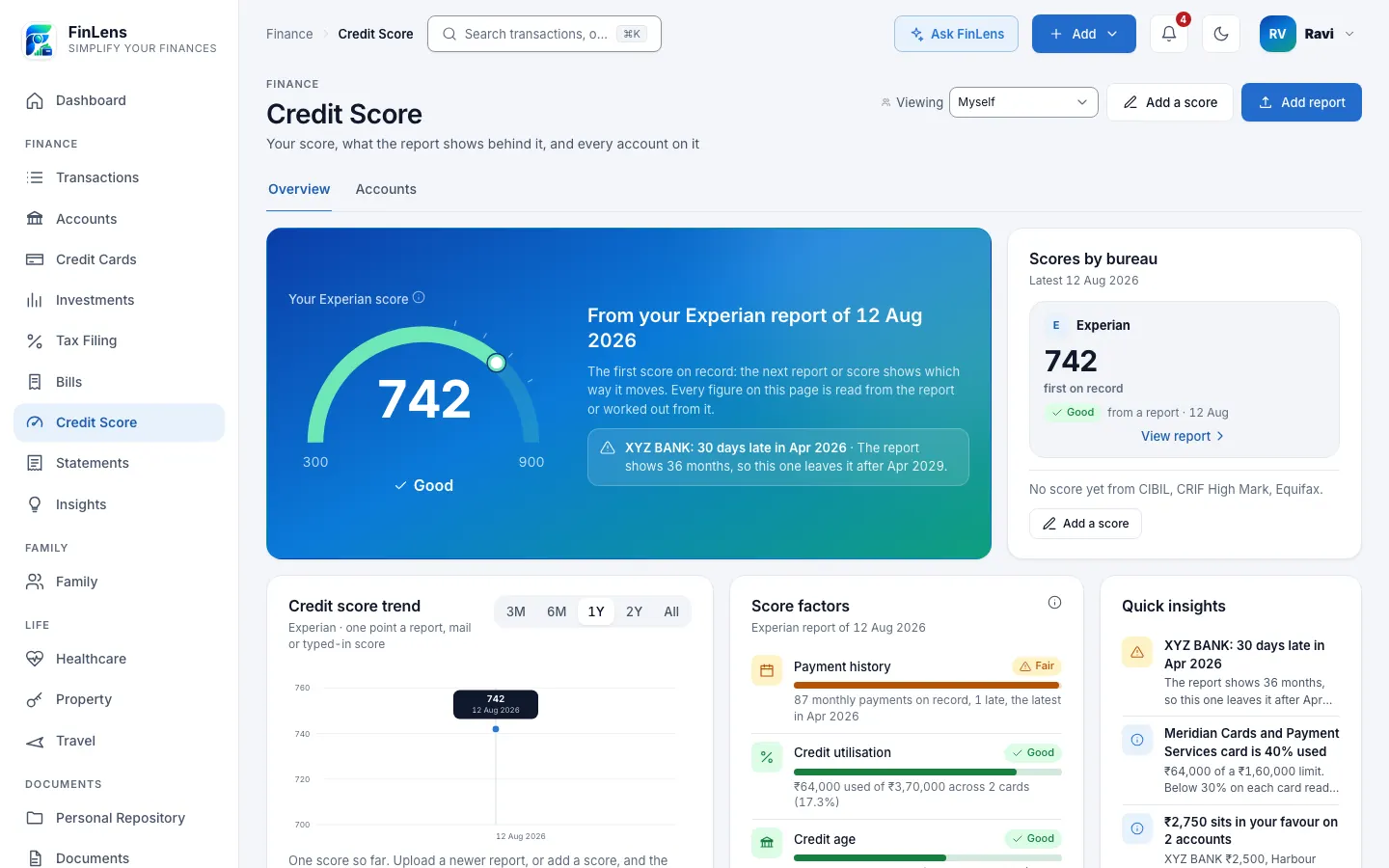
What the Credit Score page shows
Credit Score has two tabs. Overview opens with your latest score on a gauge, its band and how far it has moved, followed by Scores by bureau, a Credit score trend over 3 months to all time, Score factors, Quick insights, your Active credit accounts, Credit utilisation on your cards, and what changed since your previous report.
Accounts is the report itself as a table: every card and loan with its lender, status, limit or sanctioned amount, balance, payment history and opening date, filtered Open, Closed or All. Open one and you see its payment history month by month, with what the lender reported for each month.
Why a credit report is hard to read
A full credit report runs to many pages: a summary, a block for every account you have ever held, and a grid of codes for each month of payments. The score is easy to find, but what moves it, a late month on an old loan or a card running near its limit, is buried further in. A number on its own says little about the report behind it.
FinLens reads the whole report and lays it out as a table you can filter and open, with the score's history beside it.
Who credit score tracking is for
- Anyone planning a home, car or personal loan who wants to see what lenders will see.
- Card holders who want to know how much of their total limit is in use.
- People who download their Experian report now and then and want each one compared with the last.
- Anyone checking that an old loan or card is reported as closed.
What tracking your credit score in FinLens shows you
Your score over time
Every report, every Experian score e-mail and every score you type in becomes a point on the trend, so you can see the direction, not just today's number.
Every account in one table
Cards and loans, open and closed, with each month's payment status from the report, so a late month is easy to find.
Factors in plain words
FinLens rates payment history, credit utilisation, credit age, credit mix and new credit from the report's own figures, and shows what the bureau itself says where the report prints it.
What changed since last time
A newer report is compared with the previous one: the change in score, accounts opened and closed, new late months, and accounts newly overdue or no longer listed.
Loans counted in your net worth
The loans on your newest report appear on Accounts with what is outstanding, the EMI, rate and tenure where reported, and count in Net Worth.
How FinLens reads your Experian credit report
Download your report
Get your full Experian credit report as a PDF from Experian. FinLens does not request reports from any bureau.
Upload it
On Credit Score, tap Add report. On Add Credit Report, choose Experian under Select Bureau and upload the PDF. If the PDF is locked, you are asked for its password the first time.
The rules check it
FinLens's reader checks that the pages run in order to the end of the report, that the accounts match the printed count and summary, and that the balances add up to the printed total. If anything does not agree, the rules import nothing.
Let your mail add scores (optional)
With Gmail connected, the hourly check reads the score printed in Experian's own e-mails and queues a report attached to them.
Add a score by hand
Add a score records a number you saw in a bureau's or lender's app: the bureau, the score between 300 and 900, and the date.
What you need to track your credit score
- Your full Experian credit report as a PDF, and its password if FinLens cannot open it.
- Optionally, Gmail connected read-only, so Experian's score e-mails are read.
- Optionally, scores you type in from CIBIL, Experian, CRIF High Mark or Equifax.
What FinLens keeps from a credit report
- The score, its range and the report date.
- For each account: lender, type, status, opening, closing and reported dates, limit or sanctioned amount, balance, amount overdue, EMI, rate and tenure where reported, and the month-by-month payment history.
- The number of enquiries in the last 7, 30, 90 and 180 days.
- Your name, addresses, phone numbers, e-mail addresses, date of birth and ID numbers are read but not saved among the report's figures, beyond a count of how many different ones your lenders hold. Each account is saved with only the last 4 digits of its number and a one-way code, and the PAN only as a one-way code. The report file you upload is kept as you sent it, encrypted.
- Band words, factor ratings and insights are worked out from these figures each time you open the page and are not stored.
Good to know about credit score tracking
- Experian's full report is the one with a reader built from fixed rules; CIBIL, CRIF High Mark and Equifax reports are not read by the rules.
- A report the rules cannot read gets a single reading with AI help, masked, with the provider asked not to store the answer, and is imported only if its account count and balances agree with its own summary. A scanned report has no text to mask, so it is sent as it is.
- Score e-mails are read from Experian only; other bureaus' mails are not read.
- Accounts, factors and insights come from your newest report. FinLens cannot raise a dispute or correct a report.
- Bands are FinLens's reading: 800 and above Excellent, 750 Very good, 700 Good, 650 Fair, below that Needs work. Every lender sets its own cut-offs.
- Nothing on the page is credit advice, and FinLens cannot promise a higher score.
Questions about credit score in FinLens
Does FinLens pull my credit report from the bureau?
No. FinLens makes no enquiry with any bureau. It reads a report you download and upload, or the score Experian e-mails you.
Does FinLens work with CIBIL, Experian, CRIF High Mark and Equifax?
Experian's full report is read by FinLens's own rules, and its score e-mails are read from Gmail. A score from CIBIL, Experian, CRIF High Mark or Equifax can be typed in, and it joins your score trend. Our guide to credit scores in India explains the four bureaus.
What do Excellent, Good and Needs work mean?
They are FinLens's words for score ranges on the 300 to 900 scale, from Excellent at 800 and above to Needs work below 650. Lenders use their own cut-offs, so treat the band as a guide.
Is my PAN saved?
From a report, the PAN is saved only as a one-way code, used to check that a newer report is yours, and your name, address, phone numbers and date of birth are not saved among its figures. The report file you upload is kept as you sent it, encrypted.
Why do my loans appear on the Accounts page?
Loans on your newest report are listed under Loans on Accounts, as the lenders reported them, and count in your net worth. Loans you typed in yourself count only until a report is read.
Can my family see my score?
Only if you switch on the Credit area in Family. Reports of different members are never added together.
Related features
Bank accounts
Every account's balance and transactions, read from your bank statements and alerts, on one page.
Learn moreCredit cards
Each card's outstanding, limit used, minimum due and due date, from statements and issuer e-mails.
Learn moreFamily finance
A family view of accounts, cards and bills, with each member choosing what to share.
Learn moreAsk FinLens
Plain-English questions about your spending, cards, loans and investments, answered from your data.
Learn moreBring your whole financial picture into FinLens
FinLens is open by invitation. Ask for one with your name, mobile number and e-mail address, and a person reviews it; if you already have an account, sign in.
At present the Pro plan is free for your first year: claim it on Plan & Billing once you are in.
Or write to support@finlens.in.