 FinLens
Credit card due dates in one list, with daily reminders
FinLens lists every open credit card bill and Jio bill with its amount and due date, and sends a WhatsApp reminder each day from a week before the due date until the bill is marked paid, by you or by your issuer's payment confirmation.
- AES-256 encryption
- No bank passwords, no payments
- Two-step sign-in
- Available in India only
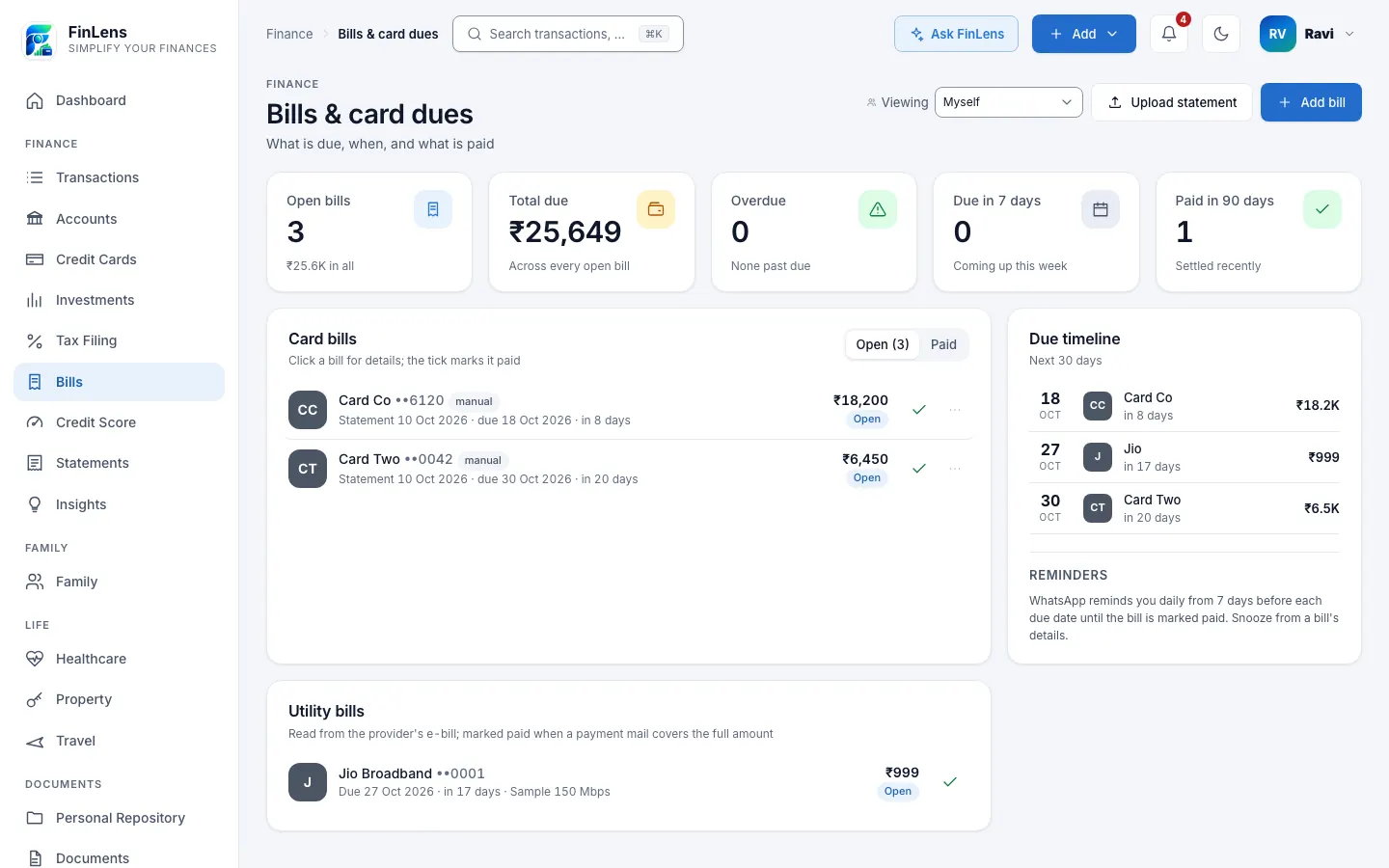
What the Bills page keeps for you
Bills, titled Bills & card dues in the app, answers three questions: what is due, when, and what is paid. Five tiles open the page: Open bills, Total due, Overdue, Due in 7 days and Paid in 90 days.
Under them, Card bills lists each card's statement with its total due, minimum due and due date, in Open and Paid tabs. A Due timeline lists every unpaid bill by its due date, and Utility bills lists your Jio mobile postpaid and JioFiber or Jio AirFiber bills once FinLens has read one. Each bill opens its details, where you can mark it paid, snooze its reminders or correct a figure.
Why due dates slip
Card due dates fall on different days of the month, and the statement that announces each one is a single e-mail among many. Some issuers remind you, some do not, and a payment made from another app leaves you unsure whether the bill is really settled.
A single list, with a reminder that keeps coming until the bill is marked paid, removes the guesswork. FinLens builds that list from your statements and your mail, and stops reminding you as soon as the payment is recorded.
Who bill reminders are for
- Anyone paying two or more credit card bills a month.
- People who prefer one reminder on WhatsApp to checking several issuers' apps.
- Jio postpaid and JioFiber or Jio AirFiber customers who want those bills beside their card dues.
- Anyone who wants the total due beside the minimum due before paying.
How a bill reminder app helps day to day
One list of what is due
Every open card and utility bill on one page, with the overdue ones and those due in the next seven days counted at the top.
A reminder until it is paid
From 7 days before the due date, WhatsApp reminds you once a day, overdue days included, until the bill is marked paid. Snooze reminders 3 days when you have it in hand.
Marked paid from your mail
When your card issuer's payment confirmation reaches your connected Gmail, FinLens marks the open bill paid. A Jio bill is marked paid by Jio's Payment received mail, an Amazon Pay bill payment mail or the next bill, for the full amount only.
The bill the moment it arrives
As soon as a card statement is stored, a card statement detected notice reaches your Inbox and WhatsApp, quiet hours or not.
Bills that arrive without an amount
For an issuer whose e-mails carry no amount, Add bill takes the bank, the card's last 4 digits, the amount and the due date, and the reminder works the same way.
How credit card due date reminders work
Bring in your bills
Upload a card statement with Upload statement on Bills, or connect Gmail so statement e-mails and their PDFs are read on the hourly check.
See the bill on Bills
FinLens records the total due, minimum due, due date and period, and adds the bill to Card bills and the Due timeline.
Get the notice
A card statement detected notice goes to your Inbox, to WhatsApp with the amount and due date, and by e-mail if your address is verified.
Get the daily reminder
Each morning, for every unpaid card bill due within 7 days or already overdue, WhatsApp sends an approved reminder template to the number you sign in with.
Mark it paid
Tick the bill on Bills, or let the issuer's payment confirmation mark it. Reminders stop at once.
Choose how you hear
In Inbox, switch WhatsApp delivery and Email delivery on or off by group, and set Quiet hours (IST) for routine messages.
What reminders need from you
- Card statements, uploaded or arriving in a connected Gmail account.
- A WhatsApp account on the mobile number you sign in with, for reminders and notices.
- A verified e-mail address in Profile, if you want notices by e-mail as well.
- For a bill you add by hand: the bank or card, optionally its last 4 digits, the amount and the due date.
What FinLens reads from bills and payment mails
- From a card statement: total due, minimum due, due date, statement date and period.
- From your mail: statement notices, the issuer's payment confirmations, Jio's bills and Payment received mails, and Amazon Pay's bill payment mails.
- From a Jio bill: the plan, the period, this month's charges, taxes, the previous balance and the payment received, checked so they add up to the total.
- On Bills: each bill's status (Open, Due soon, Overdue, Paid, or Part paid for a utility bill), the day of the last reminder, any snooze, and for a utility bill what marked it paid.
- E-mail notices carry no amounts; the amount is in the app and in the WhatsApp message.
Good to know about bills and reminders
- Daily reminders cover credit card bills; utility bills are listed with their due dates, without a reminder of their own.
- Utility bills are read from mail for Jio only: Jio mobile postpaid, JioFiber and Jio AirFiber.
- WhatsApp carries reminders and notices only and does not answer messages you type to it.
- Switching off WhatsApp delivery for Documents in Inbox also stops the reminders. At most 10 e-mails a day reach one address.
- A reminder is a convenience: a bill is due on its date whether or not a reminder arrives, so check the amount and date against the issuer's own statement.
- Profiles you manage for a family member receive no reminders.
Questions about bills & reminders in FinLens
When do credit card due date reminders start and stop?
They start 7 days before the due date and come once a day, overdue days included, until the bill is marked paid, by you or by the issuer's payment confirmation. Snooze pauses them for 3 days.
Can I reply on WhatsApp to ask what is due?
No. WhatsApp sends approved reminders and notices only and does not answer typed messages. Open Bills in the web portal, or ask Ask FinLens there.
How does a bill get marked paid?
You tick it on Bills, or FinLens marks it when your card issuer's payment confirmation reaches your connected Gmail. Jio bills are marked paid only for the full amount; a smaller payment shows as Part paid.
My card issuer's e-mails carry no amount. Can I still track the bill?
Yes. Use Add bill on Bills with the amount and due date from your statement, or upload the statement PDF itself.
Can I stop the WhatsApp reminders?
Snooze a single bill for 3 days from its details, or switch off WhatsApp delivery for Documents in Inbox to stop them altogether.
Does FinLens warn me if my cash will not cover my bills?
On Insights, a rule compares card bills due in the next 15 days with the cash in your savings accounts and flags a shortfall.
Related features
Credit cards
Each card's outstanding, limit used, minimum due and due date, from statements and issuer e-mails.
Learn moreBank accounts
Every account's balance and transactions, read from your bank statements and alerts, on one page.
Learn moreSpending insights
Every transaction in a category, with plain rules that flag spikes, dues and your savings rate.
Learn moreAsk FinLens
Plain-English questions about your spending, cards, loans and investments, answered from your data.
Learn moreGuides on this topic
How to read your credit card statement: total due vs minimum due
How to read a credit card statement in India: statement date, due date, minimum amount due vs total amount due, how interest is charged and what RBI requires.
Read the guide Personal FinanceMonthly money review: a 7-step checklist for your finances
A monthly budget checklist for Indian households: gather statements, check card dues, reconcile bank accounts, review spending, SIPs and your credit report.
Read the guideBring your whole financial picture into FinLens
FinLens is open by invitation. Ask for one with your name, mobile number and e-mail address, and a person reviews it; if you already have an account, sign in.
At present the Pro plan is free for your first year: claim it on Plan & Billing once you are in.
Or write to support@finlens.in.