 FinLens
Your mutual funds at the latest AMFI NAV, with XIRR
Upload Groww's mutual fund order history or a CAMS valuation statement and FinLens rebuilds every holding, values it at the NAV AMFI publishes and keeps the gain on each redemption.
- AES-256 encryption
- No bank passwords, no payments
- Two-step sign-in
- Available in India only
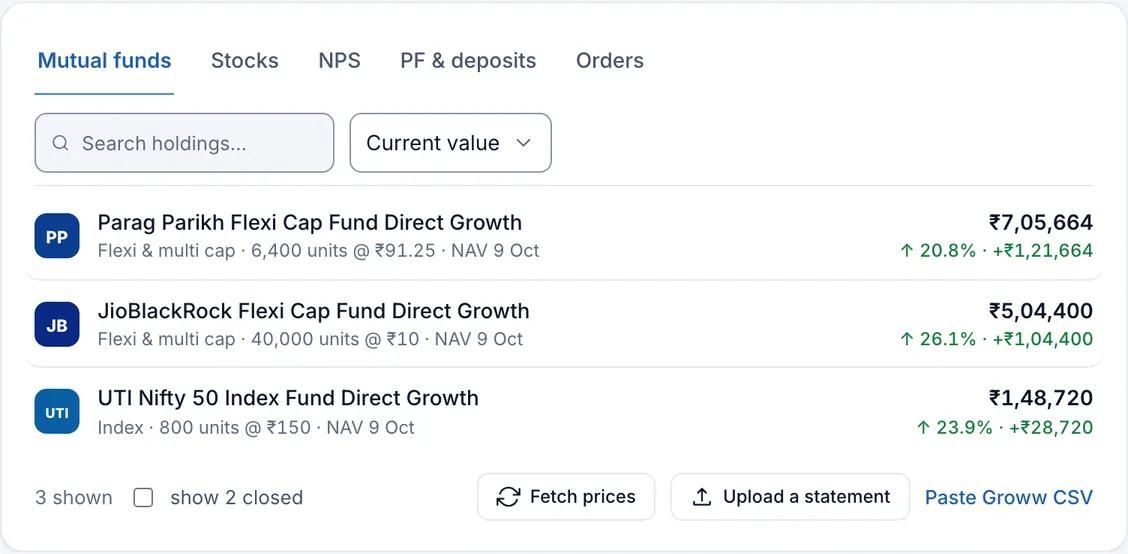
What the mutual fund tracker does
FinLens keeps a ledger of your mutual fund orders: purchases, redemptions, switches in and out, dividends and opening balances. From that ledger it works out how many units of each scheme you hold, what those units cost you and what they are worth at the latest NAV. Nothing is estimated from a screenshot or a one-off snapshot. Every figure goes back to orders you can open, edit or delete.
Each scheme is matched to its AMFI scheme code. That code is how FinLens loads the scheme's NAV history and its newest NAV, as AMFI publishes them. The Mutual funds tab on Investments lists each scheme with its fund house logo, category, units, average NAV, the date of the NAV used, current value and return.
The trouble with tracking mutual funds by hand
A platform's screen tells you today's value, but not always how it got there. Redemptions take units from your oldest purchases, so the cost of what remains changes with every sale. SIP instalments land on different days at different NAVs. A fair return on money that went in month by month needs XIRR, and XIRR is easy to get wrong in a spreadsheet.
FinLens does that arithmetic from the orders themselves and shows its working: the open lots with their dates and cost, each redemption with its proceeds and cost, and the NAV behind today's value.
Who should use this mutual fund tracker
- Investors who buy funds on Groww and want a second, independent view of their returns.
- Anyone running several SIPs who wants to see which are still active and what they come to each month.
- People who redeem from time to time and want the gain on each sale, matched against their oldest units first.
- Investors with older holdings bought elsewhere, who are happy to add those orders by hand.
Benefits of an order-based fund tracker
XIRR that respects dates
Returns overview gives an XIRR for your funds worked out from the date and amount of every order, and you can sort holdings by each scheme's XIRR.
Cost that follows your sales
Units you redeem are taken from your oldest lots first, so the invested figure is the cost of the units you still hold.
SIPs recognised
A scheme counts as an active SIP when about the same purchase comes back on about the same day in at least three of the last four months. Your SIPs shows the monthly total and the next instalment expected.
A closer look at every scheme
Open a scheme to see its value and invested lines, every order, the open lots and each redemption with its gain or loss.
Closed schemes kept
A scheme you have fully redeemed is marked Closed and can be shown again with one tick, its realised gain still on record.
How mutual fund tracking works in FinLens
Export from Groww
In Groww, download your mutual fund order history as an XLSX or CSV file.
Upload it on Add investment
Choose Mutual Funds and drop the file. If the file turns out to be something else, such as a bank statement, it stops for your review instead of being imported.
Map each scheme
New schemes are matched to AMFI codes. If the holdings card says a scheme is not mapped or needs your confirmation, choose Map & load NAVs, or open the scheme and use Confirm & load NAVs.
Fill any gaps
If your export starts after you first invested, use Add order to record an Opening balance, so units bought earlier count.
Let it update
On working days at 23:15 IST, FinLens fetches the newest NAVs and values your funds again. Fetch prices does the same whenever you like.
What you provide
- Groww's mutual fund order history, XLSX or CSV, uploaded on Add investment, or its CSV pasted with Paste Groww CSV.
- Orders typed in with Add order when you need them: a purchase, a redemption, or an opening balance for older holdings.
- A new scheme's name as Groww prints it, when you add a fund that is new to your list.
- Your confirmation of a scheme's AMFI code when FinLens finds more than one possible match.
What FinLens reads from your fund orders
- Scheme name, order date, transaction type, units, NAV and amount for each order.
- The fund house and the category, worked out from the scheme's name.
- Units held, average NAV, invested amount, current value, and the return in rupees and per cent.
- Realised gain on each redemption and the lots still open, matched first in, first out.
- An XIRR for each scheme (used for sorting), for all your funds, and for the portfolio.
- A History incomplete badge when the export shows more units redeemed than it shows bought.
Good to know before you start
- Groww's order export and the CAMS portfolio valuation statement are read. Consolidated account statements (CAS), KFintech statements and other platforms' exports have no reader of their own; their orders can be typed in.
- NAVs are fetched once a night on working days, so the value is as of the last published NAV, never intraday.
- A scheme that cannot be matched to an AMFI code has no value until you confirm its code.
- The history reaches back only as far as your export; units bought before it are added with an Opening order.
- Gains are shown before tax; FinLens does not work out capital gains tax.
- When the rules cannot read a file, it can be read once with AI help, with identifying details replaced by placeholders and the provider asked not to store the answer, and its orders are kept only if they pass the same checks.
Questions about mutual funds in FinLens
Does FinLens keep direct and regular plans apart?
Yes. Each scheme is kept under the name Groww prints, so the direct and regular plans of one fund are separate rows, each with its own AMFI code and NAV.
What does History incomplete mean?
Your export shows a redemption of more units than the purchases it lists, usually because the units were bought before the export starts. Add an Opening order for them with Add order and the figures line up.
How are SIPs found without me entering them?
FinLens looks at your purchases over the last four months. The same scheme bought for about the same amount on about the same day in at least three of them, the latest within 40 days, counts as a running SIP. The next date is shown as expected, because it is an inference.
Can I add funds bought on another platform?
Yes, by hand. On Investments, Add order records a purchase, a redemption or an opening balance against any scheme, including a new one you name. FinLens then values it like the rest.
If I upload a newer export, will orders be counted twice?
No. Orders already on file are recognised and skipped, so you can upload a longer export whenever you like.
Related features
Investments
Funds, stocks, NPS, deposits, EPF and PPF on one page, valued at published prices.
Learn moreStocks
Shares and ETFs from your Groww orders, valued at BSE closes, with realised profit and XIRR.
Learn moreNPS, EPF & PPF
NPS contributions, units, gain and XIRR from CRA statements; EPF and PPF as balances you record.
Learn moreBring your whole financial picture into FinLens
FinLens is open by invitation. Ask for one with your name, mobile number and e-mail address, and a person reviews it; if you already have an account, sign in.
At present the Pro plan is free for your first year: claim it on Plan & Billing once you are in.
Or write to support@finlens.in.