 FinLens
Your mutual funds, stocks, NPS and deposits in one view
FinLens puts your mutual funds, shares, NPS, fixed deposits and the balances you record yourself on one page, values them at published prices and shows what each has earned.
- AES-256 encryption
- No bank passwords, no payments
- Two-step sign-in
- Available in India only
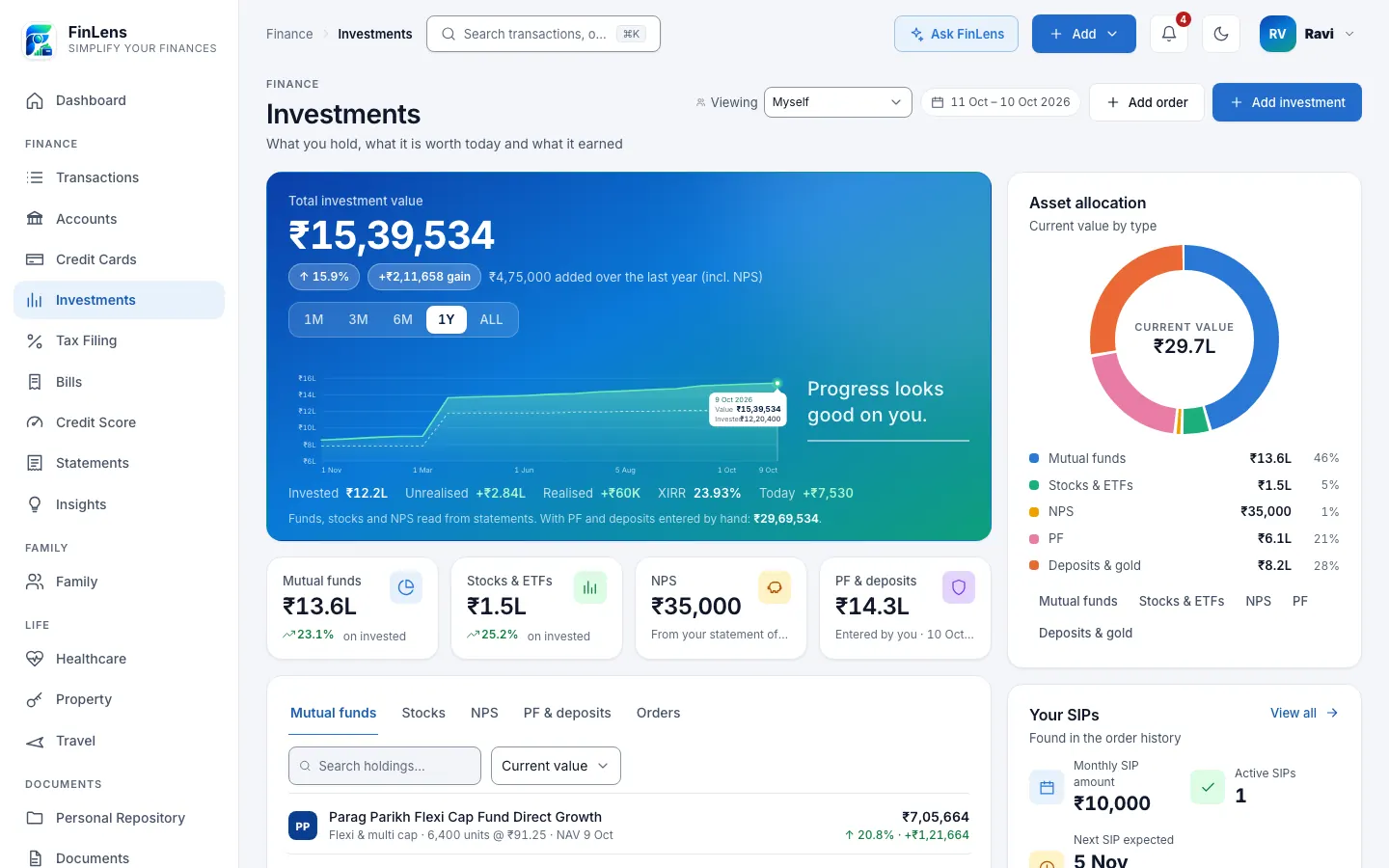
What the FinLens investment tracker covers
The Investments page brings together what you hold in different places. Mutual funds and shares come from the order history you export from Groww. Your NPS account comes from the statements issued by your Central Record-keeping Agency (CRA). Fixed deposits come from the Deposits section of Accounts, where IDFC FIRST Bank's deposit advice is read and a deposit with any other bank is typed in. EPF, PPF and gold are balances you enter yourself.
At the top sits Total investment value with a trend line, and under it what you invested, the unrealised and realised gain, an overall XIRR and today's move. Four tiles split the picture into Mutual funds, Stocks & ETFs, NPS and PF & deposits. Below them a holdings card has a tab for each, plus Orders, the full list of purchases and sales. Asset allocation, Your SIPs and Returns overview sit alongside.
Why one investment portfolio view helps
Most people hold investments in more than one place: a fund platform, a demat account, an employer's NPS, a bank deposit, a provident fund. Each shows its own number on its own screen, and none of them adds up the rest. Knowing your total, or whether your money is earning more than a deposit would, usually means a spreadsheet that is rarely up to date.
FinLens keeps that sum for you. It works from the records themselves (orders, statements and advices), so every figure can be traced back to its source instead of being typed from memory.
Who this portfolio tracker suits
- You invest through Groww and also have NPS, a deposit or a provident fund elsewhere.
- You run monthly SIPs and want to see which are still running without opening each app.
- You want one XIRR for your whole portfolio, not just for a single fund.
- You look after a parent's money and keep it in a profile you manage through Family, next to your own.
What you gain from tracking investments in one place
Total value with its history
The trend is drawn from daily prices, with the money you put in shown as a dashed line behind it, so growth and new money are easy to tell apart.
Gain, not just growth
For the range you pick, the page shows the gain separately from what you added, so a few months of SIP instalments are not mistaken for returns.
Allocation at a glance
Asset allocation splits your current value across mutual funds, stocks and ETFs, NPS, PF, and deposits and gold, with each share of the whole.
SIPs found for you
Your SIPs lists the monthly purchases FinLens recognises in your fund orders, the monthly total and when the next one is expected.
Returns by asset type
Returns overview compares XIRR or absolute return for funds, stocks and NPS, with one overall XIRR for the three together.
Part of your net worth
The same values count in the net worth shown on the Dashboard and on Accounts, beside your bank balances, card dues and loans.
How investment tracking works in FinLens
Open Add investment
On Investments, choose Add investment and pick NPS, Mutual Funds, Stocks or PF. Each tile names the files FinLens reads for that type.
Upload the file
Drop a Groww order export (XLSX or CSV), a CAMS portfolio valuation statement or a CRA statement (PDF). Fixed rules read it and check it before anything is stored, and orders already on file are skipped.
Add what no file shows
Record EPF, PPF or gold under Settings → Assets & loans, in Other assets. Add a fixed deposit on Accounts, from IDFC FIRST Bank's advice or typed in.
Let prices update
On working days at 23:15 IST, after the market closes, FinLens fetches the latest mutual fund NAVs and BSE closing prices and values your holdings again.
Look closer
Open any holding for its orders, open lots and realised gains; switch tabs, search and sort the table, or change the range on the trend.
What you provide for the Investments page
- Groww's mutual fund order history export, as XLSX or CSV.
- Groww's stock order history export, as XLSX or CSV.
- NPS transaction statements and the Statement of Holding from your CRA, as PDF (the holding's text can also be pasted).
- IDFC FIRST Bank's fixed deposit advice (PDF), or the details of a deposit at another bank, typed in.
- EPF, PPF and gold balances, typed in with the date each is as of.
- Orders added by hand when you need them, for example an opening balance for funds bought before your export begins.
What FinLens reads and shows
- Every order: the scheme or share, date, type, units or quantity, price and amount.
- Units held and what they cost, worked out first in, first out, with the realised gain on every redemption or sale.
- Value at the latest NAV published by AMFI and the latest BSE close.
- XIRR for each asset type and for the portfolio, and the absolute return beside it.
- NPS value, contributions, gain, XIRR and charges for each tier, from the CRA's own statements.
- A daily value series for the trend, kept for market days only.
Good to know about the Investments page
- Mutual funds are read from Groww's order exports and CAMS portfolio valuation statements, stocks from Groww's order exports. Consolidated account statements (CAS), KFintech statements and other brokers' exports have no reader of their own; you can type orders in instead.
- EPF and PPF are the balances you type in, shown as entered by you, with no return figure; an EPF passbook is not read.
- NPS is valued from its statements rather than a daily price feed: its value moves when you upload a newer statement or record a NAV yourself.
- Fixed deposit advice is read for IDFC FIRST Bank only; deposits at other banks are typed in.
- Prices are fetched once a night on working days, so values are as of the last close, never live.
- If the fixed rules cannot read an uploaded file, it is read once with AI help, with names and identifying numbers replaced by placeholders and the provider asked not to store the answer, and imported only if the same checks pass. You can turn this off in Profile → Privacy & Security.
- FinLens shows and organises your investments; it never buys or sells, starts SIPs or gives investment advice.
Questions about investments in FinLens
Can FinLens buy or sell investments for me?
No. FinLens never moves money and never places orders. It reads what you have already bought and sold, and shows what it is worth.
Does it read my CAMS or KFintech statement?
A CAMS portfolio valuation statement (PDF) is read, and the units it prints are set against your orders. Consolidated account statements (CAS) and KFintech statements have no reader of their own: add those funds' orders on Investments with Add order and they are valued like the rest.
How is the total investment value worked out?
The units and quantities in your orders are multiplied by the latest published NAV or BSE close, and your NPS value from its latest statement is added. PF, deposits and gold have their own tile and slice of the allocation, and all of them count in your net worth.
Is my data sent to the price sources or to Groww?
No. FinLens downloads public NAVs and closing prices, and those requests name a scheme or a date, never you. Nothing is sent to Groww: you download the export yourself.
A fund shows no value. What do I do?
Each scheme has to be matched to its AMFI code first. When the holdings card says a scheme is not mapped, choose Map & load NAVs, or Review mapping to confirm the code in Settings → Investments.
Which portfolio tracker covers mutual funds, stocks and NPS together in India?
FinLens values all three on one Investments page: mutual funds at the latest AMFI NAV from your Groww export, CAMS or CDSL statement; shares and ETFs at the latest BSE close; NPS from your CRA statements; with fixed deposits, EPF and PPF beside them, and the gain, XIRR and allocation of the whole.
Related features
Mutual funds
Every scheme rebuilt from its orders, valued at AMFI NAVs, with XIRR and your SIPs.
Learn moreStocks
Shares and ETFs from your Groww orders, valued at BSE closes, with realised profit and XIRR.
Learn moreNPS, EPF & PPF
NPS contributions, units, gain and XIRR from CRA statements; EPF and PPF as balances you record.
Learn moreBank accounts
Every account's balance and transactions, read from your bank statements and alerts, on one page.
Learn moreGuides on this topic
How to track your mutual funds: NAV, units, XIRR and direct plans
Mutual fund XIRR calculation for SIPs, how it differs from CAGR and absolute return, with a worked example, NAV cut-off times and direct vs regular plans.
Read the guide EPF and NPSEPF vs PPF vs NPS: how the three retirement schemes compare
EPF vs PPF vs NPS compared for FY 2026-27: who can join, interest rates and returns, lock-in, withdrawal rules, and tax under the old and new regimes.
Read the guideBring your whole financial picture into FinLens
FinLens is open by invitation. Ask for one with your name, mobile number and e-mail address, and a person reviews it; if you already have an account, sign in.
At present the Pro plan is free for your first year: claim it on Plan & Billing once you are in.
Or write to support@finlens.in.