 FinLens
All your bank accounts and balances in one place
Upload a bank statement PDF or connect Gmail read-only. FinLens reads each account's balance and transactions by fixed rules, checks every row against the balances the bank prints, and puts every account side by side on one Accounts page.
- AES-256 encryption
- No bank passwords, no payments
- Two-step sign-in
- Available in India only
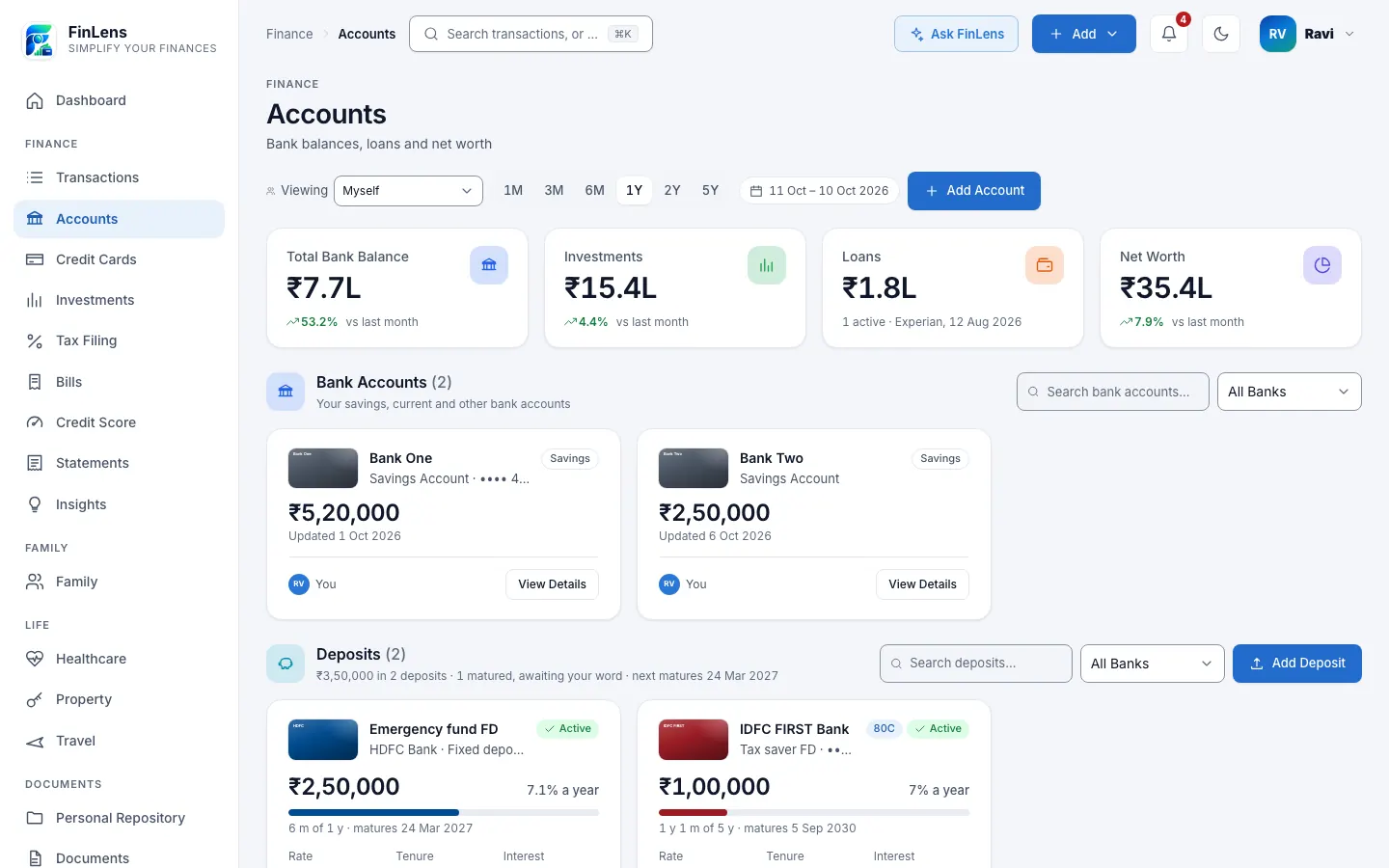
What the Accounts page shows
Accounts is the page in FinLens where your savings, salary and current accounts sit together. Each account appears as a card with its bank, the last 4 digits of its number, its latest balance and where that balance came from: the month of the last statement, or the day of the last alert. Above the cards are four figures: Total Bank Balance, Investments, Loans and Net Worth, which is your assets minus what you owe on cards and loans.
Below the bank accounts, the same page lists fixed deposits read from their advice or typed in, and the loans on your latest credit report. An Account Insights panel counts your accounts and your liquid cash, and Recent Account Activity shows the latest transactions across every bank. Credit cards have a page of their own.
Why keeping track of several bank accounts is hard
Many people in India hold accounts at more than one bank: one for salary, one from an old job, one for a home loan's EMI. Each bank has its own app, its own statement layout and its own password on the PDF. To know how much cash you have today, you sign in to each one and add the numbers up yourself.
FinLens reads what your banks already send you, the monthly statement and the debit and credit alerts, and turns them into one list you can search.
Who the bank account view is for
- Anyone with accounts at two or more banks who wants one total without opening several apps.
- People whose statements arrive as password-protected PDFs and pile up unread in the inbox.
- Anyone who wants a bank statement analyser that never needs a net banking login or password.
- Families who look after a parent's accounts alongside their own, through Family.
What you get from reading your bank statements in FinLens
One balance across banks
Total Bank Balance adds up the latest balance of every live account, from statements and bank alerts, so you see your cash in one figure.
Statements checked, not guessed
For the banks it has rules for, FinLens chains every row from the opening balance to the closing one and checks the totals wherever the bank prints them. If they do not agree, the rules import nothing rather than a wrong figure.
Locked PDFs opened once
Type a statement's password once and it is kept, encrypted, for that file. Tick the box and FinLens tries it on your other locked files too.
Each account's own story
View Details opens a popup with the balance, the money spent and credited in the last 30 days, the account's details and a Recent activity tab with its latest transactions.
Old accounts out of the way
Mark as closed takes an account off the list and out of net worth while its transactions stay searchable. Hide does the same for an account you simply do not want to see.
How the bank statement analyser works
Open Accounts and tap Add Account
The Add Bank Account screen opens. Pick your bank under Select Bank, or leave it on Other bank to have it detected from the file, then choose the statement PDF.
FinLens detects the details
In the Detect Details step the rules read the bank, the period, every row, the balances and the account's last 4 digits while you watch. A locked PDF asks for its password here.
Review, only when needed
FinLens stops to ask only if the statement does not print the account's last 4 digits, the bank you chose does not match the file, or the file could not be read.
The account appears
At Ready the account is on Accounts with its balance and transactions. Uploading the same rows again never counts them twice.
Keep it current with Gmail (optional)
Connect Gmail under Profile, Accounts & Connections. The hourly check from 06:00 to 23:00 IST reads your banks' alert e-mails and queues any statement PDF they attach.
What you need for bank statement analysis
- Bank statement PDFs, downloaded from net banking or attached to your bank's e-mail (up to 10 MB a file; the first 100 pages are read).
- The PDF's password, if the usual password shapes for your bank do not open it.
- The account's last 4 digits, only when the statement does not print them.
- Optionally, Gmail connected with read-only access, for alert e-mails and mailed statements.
- Optionally, a nickname, a primary account, or a manual balance with its date under Manage.
What FinLens reads from statements and alerts
- From a statement: the bank, the period, each transaction's date, narration, amount and direction, the running balance, the opening and closing balances, and details such as the branch and IFSC where printed.
- From an alert e-mail: the amount, the date, the payee or merchant, the channel (UPI, IMPS, NEFT, card, ATM) and the balance when the alert states one. The mail itself is not stored.
- A category for every transaction, decided by fixed rules; money moved between your own accounts is filed as a transfer, not spending.
- The account itself, saved with only the last 4 digits of its number, shown as •••• 1234. The statement file you upload is kept as you sent it, encrypted.
Good to know about the bank account view
- FinLens works from what your bank sends you and has no live link to your bank, so a balance is as fresh as the last statement or alert it has read.
- Eight banks have dedicated readers built from fixed rules; a statement from any other bank is read with AI help, as described next.
- A statement the rules cannot read is read once with AI help, with names and identifying numbers replaced by placeholders and the provider asked not to store the answer, and its reading is imported only if the same checks pass. A scanned PDF has no text to mask, so it is sent as it is.
- Alert e-mails are read only from senders FinLens has rules for, and mail you forward to yourself is ignored.
- FinLens shows your money and never moves it or makes a payment.
Questions about bank accounts in FinLens
Does FinLens connect to my bank account or need my net banking login?
No. FinLens has no link to any bank and never asks for your net banking login or password. It reads the statements you upload and, if you connect Gmail read-only, the alerts and statements your bank e-mails you. It cannot move money.
Which Indian banks' statements can FinLens read?
Fixed rules read Axis Bank, HDFC Bank, ICICI Bank, IDFC FIRST Bank, Jio Payments Bank, Kotak Mahindra Bank, State Bank of India and Union Bank of India. A statement from any other bank gets one reading with AI help, masked, and is imported only if it passes the same checks.
My bank statement PDF has a password. What do I do?
Upload it as it is. FinLens tries the password shapes it knows; if none opens the file, it asks you once and keeps the password encrypted for that file. Our guide to password-protected bank statements explains why banks lock them.
Is my full account number saved with my account?
No. Every bank account is saved with only the last 4 digits of its number, even when the statement prints the full number. The statement file you upload is kept as you sent it, encrypted.
What if I upload the same statement twice?
Nothing is doubled. A file already in your data is marked Already imported, and rows FinLens already holds are skipped.
Why is a balance out of date?
The balance comes from your latest statement or alert. Upload a newer statement, or open the account, choose Manage and enter a manual balance with its date; the next bank alert replaces it.
What is the best way to keep every bank statement and account in one dashboard?
Let the statements do the work. Upload each bank's PDF or connect Gmail read-only, and FinLens reads every account's balance and transactions by fixed rules, checks each row against the balances the bank prints, and puts all your accounts side by side, with the last 4 digits of each number and never the whole.
Related features
Credit cards
Each card's outstanding, limit used, minimum due and due date, from statements and issuer e-mails.
Learn moreSpending insights
Every transaction in a category, with plain rules that flag spikes, dues and your savings rate.
Learn moreBills & reminders
Card and Jio bills with due dates, and a daily WhatsApp reminder from 7 days before each due date.
Learn moreFamily finance
A family view of accounts, cards and bills, with each member choosing what to share.
Learn moreGuides on this topic
How to open a password-protected bank statement PDF
Find your bank or credit card statement PDF password: where banks in India write the rule, common patterns, why a password fails, and how to remove it safely.
Read the guide Personal FinanceMonthly money review: a 7-step checklist for your finances
A monthly budget checklist for Indian households: gather statements, check card dues, reconcile bank accounts, review spending, SIPs and your credit report.
Read the guideBring your whole financial picture into FinLens
FinLens is open by invitation. Ask for one with your name, mobile number and e-mail address, and a person reviews it; if you already have an account, sign in.
At present the Pro plan is free for your first year: claim it on Plan & Billing once you are in.
Or write to support@finlens.in.