 FinLens
NPS tracker: every contribution, read from your CRA statements
Upload your NPS transaction statements and Statement of Holding from your Central Record-keeping Agency (CRA), and FinLens keeps every contribution and unit movement. EPF and PPF sit beside it as balances you record.
- AES-256 encryption
- No bank passwords, no payments
- Two-step sign-in
- Available in India only
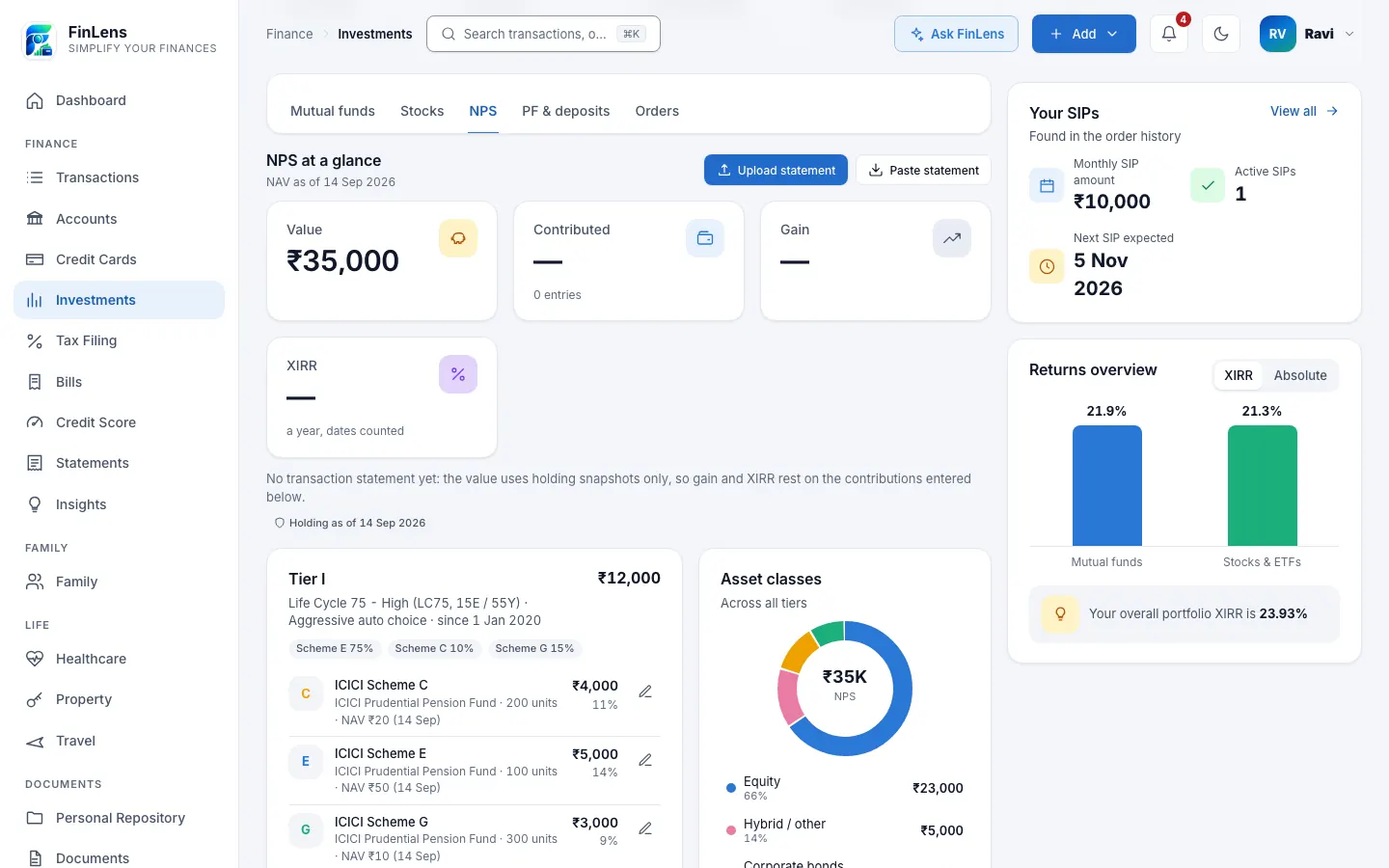
What the NPS tracker keeps
Your NPS money is spread across schemes run by pension fund managers (equity, corporate bonds, government securities and, for some accounts, alternative assets), and the CRA's statement is the one full record of it. FinLens reads that statement into a ledger: each contribution, marked as employee, employer, voluntary or arrear, and for every scheme each allotment, switch, charge and unit balance. The NPS tab on Investments shows it as NPS at a glance (value, contributed, gain, XIRR and charges), a card per tier with its schemes and your preference, the asset classes across all tiers, and a table of contributions.
EPF and PPF are kept as balances you record, and the page shows them as entered by you. You add each balance with the date it is as of, and it appears under PF & deposits, in the asset allocation and in your net worth. FinLens does not read an EPFO passbook or a PPF account.
Why NPS is hard to follow on your own
An NPS transaction statement runs to many pages. Each contribution is split across schemes by your chosen allocation and bought at that day's NAV; charges are taken in units every quarter; a change of scheme or fund manager shows up as units leaving one scheme and arriving in another. Statements cover whatever period you ask for, so two downloads often overlap. Working out by hand what you have put in and what it has earned can take an afternoon.
FinLens reads each statement row by row, recognises the rows it already has, and keeps one running record however many overlapping statements you upload.
Who the NPS tracker is for
- Salaried people whose employer pays into NPS and who want to see the employer and employee parts of each credit.
- Subscribers who also make voluntary contributions and want them in the same record.
- Anyone weighing NPS against EPF and PPF who wants all three on one page, with EPF and PPF as balances they record. Our guide compares the three schemes.
What you can do with your NPS record
Overlapping statements, no duplicates
Every row gets a fingerprint, so a statement for April to September uploaded after one for April to mid-September adds only the weeks that are new.
A cross-check against the CRA
The CRA cross-check compares the CRA's own totals since the account opened with what FinLens holds, and says when contributions were made before your earliest statement.
Gain and XIRR on contributions
Gain and XIRR are worked out from the dates and amounts of what you put in, so a year of monthly credits is measured fairly.
Charges in plain view
Charges the CRA deducted in units are added up and shown, so you can see what the account has cost.
Coverage and gaps
A strip shows the period your statements cover, flags any gap, and names the date your next statement should start from.
Units that must reconcile
For every scheme, the opening units plus the rows must equal the closing units, or the statement is not imported.
How NPS tracking works in FinLens
Download from your CRA
From your CRA's website, download the NPS transaction statement for the period you want, and the Statement of Holding.
Upload on Add investment
Choose NPS and drop the PDF; FinLens tells the two statements apart by itself. On the NPS tab, Paste statement takes the holding's text copied from the CRA page.
Rules read and check it
Fixed rules read the Protean (formerly NSDL) CRA layout, check each scheme's units, and import only rows not already held.
Fill in between statements
Use Add, Monthly recurring or From transactions for contributions a statement does not yet cover, and Set a NAV on a scheme to record a newer price. A statement that later covers the same payment replaces the estimate.
Record EPF and PPF
In Settings → Assets & loans, add an EPF or PPF entry under Other assets with its balance and date, and update it when your passbook changes.
What you provide
- NPS transaction statements (PDF) for any periods, uploaded in any order.
- Your CRA's Statement of Holding (PDF), or its text copied from the CRA page.
- Optionally, contributions and NAVs entered by hand until your next statement arrives.
- Your EPF and PPF balances, each with the date it is as of.
What FinLens reads from an NPS statement
- The statement period, the tier, your scheme choice and preference, and each scheme's units, NAV and value.
- Every contribution with its date, kind, and the employee and employer amounts.
- Every unit movement in each scheme: allotments, moves between schemes or fund managers, and charges.
- The CRA's own figures since the account opened (contributions, value, gain, charges and its XIRR), kept as a cross-check.
- Only the last four digits of your PRAN. Your name, address, contact details, bank account and nominee are not stored.
Limitations, said plainly
- EPF and PPF are the balances you type in: there is no EPFO passbook or PPF reader, no return figure is shown for them, and they change only when you update them.
- The NPS value moves when you upload a newer statement or use Set a NAV; FinLens has no daily NAV feed for NPS.
- The fixed rules are built on Protean CRA statements for Tier I and also read the Tier II sections of the Statement of Holding. A Tier II transaction statement has not been tested on a real file.
- A transaction statement the rules cannot read can be read once with AI help, by an AI model with names and numbers masked and the provider asked not to store the answer. From such a reading only the contributions are imported, not each scheme's unit ledger.
- Contributions made before your earliest uploaded statement are missing until you upload the earlier period.
- FinLens reads and shows your NPS; it does not pay contributions or change your scheme.
Questions about nps, epf & ppf in FinLens
Can FinLens read my EPF passbook?
No. FinLens keeps EPF as a balance you record: you type it in Settings → Assets & loans, and it is shown as entered by you, with its date. There is no EPFO passbook reader, and PPF works the same way.
I uploaded two statements that overlap. Are contributions counted twice?
No. Each row is recognised by its date, kind, amounts and units, so rows already held are skipped and only the new ones are added.
Why does my NPS value not change every day?
The value moves when a newer statement is uploaded, or when you record a NAV yourself with Set a NAV, as there is no free public feed of NPS NAVs for FinLens to use.
Is my PRAN stored?
Only its last four digits. The name, address, contact details, bank account and nominee printed on the statement are not stored.
Can I add my employer's monthly contribution before the statement shows it?
Yes. Monthly recurring adds one row a month, and From transactions picks up NPS payments found in your bank transactions. Both count as estimates until a statement covers those dates.
Related features
Investments
Funds, stocks, NPS, deposits, EPF and PPF on one page, valued at published prices.
Learn moreMutual funds
Every scheme rebuilt from its orders, valued at AMFI NAVs, with XIRR and your SIPs.
Learn moreBank accounts
Every account's balance and transactions, read from your bank statements and alerts, on one page.
Learn moreBring your whole financial picture into FinLens
FinLens is open by invitation. Ask for one with your name, mobile number and e-mail address, and a person reviews it; if you already have an account, sign in.
At present the Pro plan is free for your first year: claim it on Plan & Billing once you are in.
Or write to support@finlens.in.