 FinLens
Your family's finances, policies and papers, shared on your terms
Invite family members who use FinLens, or keep a profile for someone who does not. Each member decides, area by area, what the family sees: figures, never full numbers or files. Share Insurance, and a policy the family never knew about cannot go unclaimed.
- AES-256 encryption
- No bank passwords, no payments
- Two-step sign-in
- Available in India only
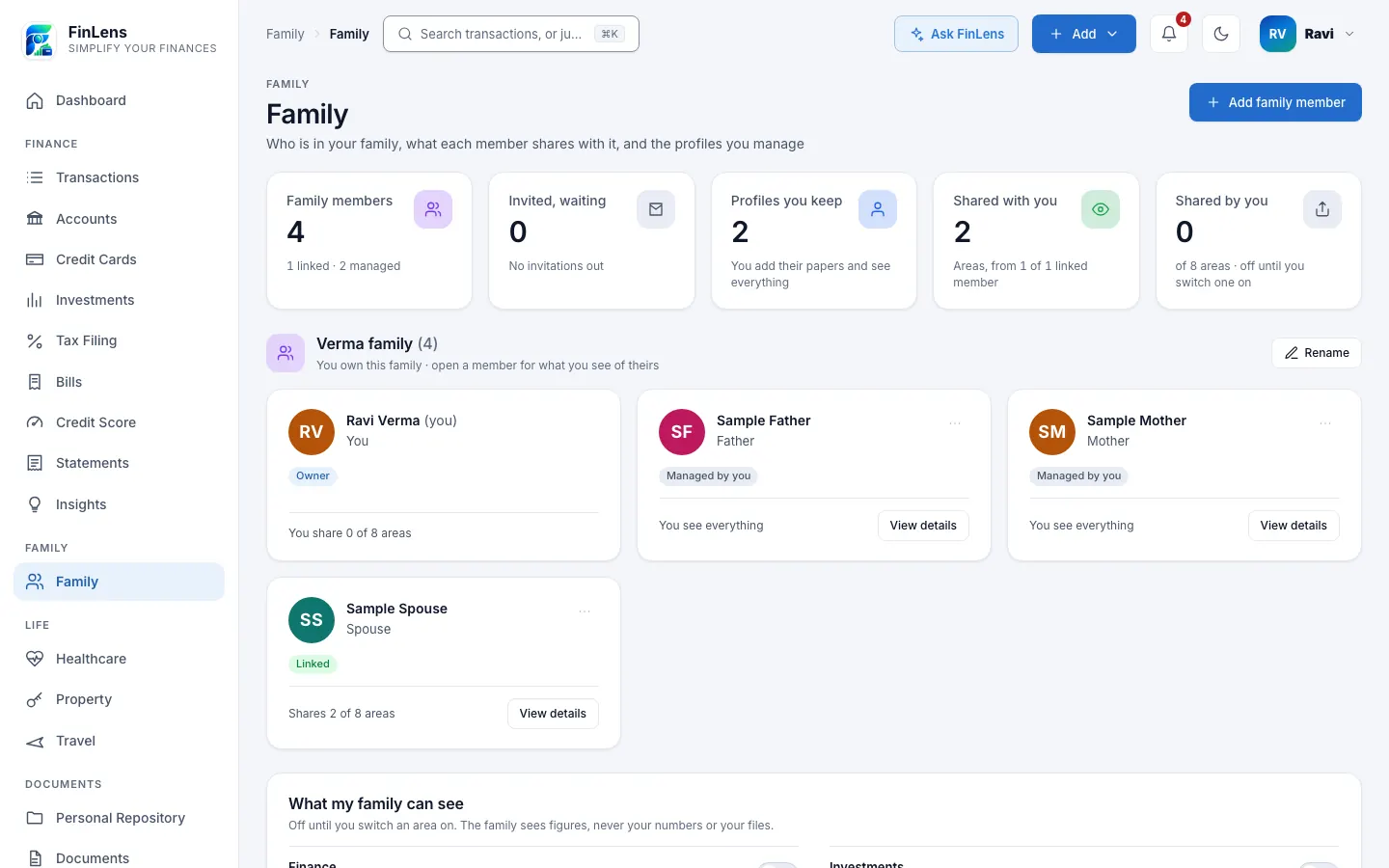
What FinLens Family is
Family is a page in FinLens for the people whose money you look at together. A family has one owner, who adds people in two ways. They use FinLens sends an invitation to someone who already has an account; they join only if they accept, and they choose what the family sees. Add them myself creates a profile you keep for someone who does not use FinLens, such as a parent whose statements you already handle.
Once your family has another member, the money pages gain a Viewing menu: Myself, All members, or one member by name. The Dashboard has a Personal and Family switch, with a Who holds what card that sets each member's net worth, bank balance, investments, cards and loans side by side, and says Not shared where a member keeps an area closed.
Why family money is hard to see in one place
Households rarely keep money in one name. One spouse holds the home loan, the other the credit cards; an ageing parent's pension account and insurance papers sit in a drawer you look after. Seeing the whole picture usually means sharing passwords, forwarding PDFs or asking each person for screenshots, and it is all or nothing.
FinLens Family lets each person share only what they choose, in figures, while their own login, numbers and files stay with them.
Who a family finance app is for
- Couples who want one view of both their accounts, cards and loans.
- Adult children who manage a parent's bank statements, policies and property papers.
- Families who want each member's credit score and bills visible to the others, by agreement.
- Anyone who wants to share figures without handing over a password.
How sharing family finances works for you
Share area by area
Under What my family can see, each member switches on Finance, Investments, Credit, Documents, Insurance, Property, Tax or Travel. For a member who joins by invitation, every area is off until they turn it on.
Figures, never files
The family sees figures. Accounts and cards are saved with only the last 4 digits of their numbers, and a member's stored files never open for anyone else, with or without a PIN.
Look after someone who does not use FinLens
A profile you keep holds a parent's statements and papers. You add them, see everything read from them, and can delete the profile with everything in it.
One view of everyone
All members adds the figures up and lists each member's rows with a chip naming whose they are, on pages such as the Dashboard, Accounts, Credit Cards, Bills and Transactions.
Private things stay private
Your Profile, Inbox, Settings, the Personal Repository with Notes & Vault, and Ask FinLens always show your own data, whoever you are viewing.
How to set up your family in FinLens
Start your family
Open Family and tap Add a family member. Your first addition creates the family, named after your surname; you can rename it.
Invite someone who uses FinLens
Choose They use FinLens, enter their mobile number and pick the Relationship to you. Only their first name is shown until they accept. Send invitation; it stays open for 3 days and can be resent once a day.
They accept, and choose what to share
The invitation appears on their Family page with Accept and Decline. Joining shares only their name and relationship; each area is shared when they switch it on.
Or add a profile you keep
Choose Add them myself and enter their full name, mobile number and relationship, with date of birth and e-mail if you like. Then upload their statements as you would your own, with their profile chosen in Viewing.
View the family
Pick All members or one person in Viewing on any money page, or switch the Dashboard to Family.
What you need to set up a family
- The mobile number of each member you invite, and how they are related to you.
- For a profile you keep: the person's name, mobile number and relationship, their statements and papers, and their agreement to keep them in FinLens.
- For your own account: the areas you choose to share.
What each sharing area shows the family
- Finance: accounts, cards, transactions, statements and bills.
- Investments: mutual funds, stocks, NPS, PF and deposits. Credit: the credit score, the report behind it and loans.
- Documents: uploaded documents and what was read from them, though the files themselves open only for their owner.
- Insurance: policies and premiums. Property: land, houses and vehicles. Tax: filed tax returns. Travel: trips found in booking mails.
- A linked member's data is read-only for the rest of the family; their mobile number and e-mail are never shown to others.
Limits of family sharing
- A person can belong to one family at a time, and only the family's owner adds people. The owner cannot leave their own family.
- An invitation can go only to someone who already uses FinLens; joining FinLens is by invitation. A profile you keep becomes the person's own account only when FinLens allows their number and they sign in.
- Credit reports of different members are never added together; choose one member to see a report.
- Profiles you keep receive no WhatsApp or e-mail messages, and Ask FinLens answers only from your own data.
- Invitations and family notices arrive in the FinLens Inbox, and by e-mail where the address is verified.
Questions about family finance in FinLens
Can my family see my account numbers?
No. Accounts and cards are saved with only the last 4 digits of their numbers, and the family sees figures. Your stored files never open for another member.
What does a family member see when I join?
Only your name and your relationship to them. Each area, such as Finance or Credit, is shared only when you switch it on in What my family can see.
Can I manage my parents' finances if they do not use FinLens?
Yes. Add them myself creates a profile you keep, and you upload their statements and papers. You are responsible for having their agreement to keep their papers in FinLens.
What happens if my parent later joins FinLens?
Choose Invite to FinLens on their profile. When they first sign in with that number, the profile becomes their own account under their control, with every area shared; they can switch any of them off.
How do I stop sharing?
Switch an area off in What my family can see, and the family no longer sees it. A linked member can also choose Leave the family; their account and data stay as they are.
Can I be in two families?
No. A person belongs to one family at a time; to accept another invitation, leave your current family first.
What is the best way to keep the whole family's financial information in one place?
One place that each person controls. In FinLens a family has one owner; members who use FinLens join by invitation and switch on, area by area, what the family sees: accounts, investments, credit, documents, insurance, property, tax and travel. A parent who does not use the app has a profile you keep. The family sees figures, never full numbers or files, and nothing until a member switches an area on. With Insurance shared, a policy a family member never knew about can no longer go unclaimed: the figures and the rules.
Related features
Insurance
Medical, life and term policies with cover, members, premiums and renewal dates in one place.
Learn moreBank accounts
Every account's balance and transactions, read from your bank statements and alerts, on one page.
Learn moreCredit cards
Each card's outstanding, limit used, minimum due and due date, from statements and issuer e-mails.
Learn morePersonal Repository
Personal papers, notes and passwords, locked in your browser with a key only you hold.
Learn moreGuides on this topic
Why life insurance money goes unclaimed in India, and how to make sure your family can claim
₹21,718 crore of insurance money lay unclaimed in India in 2024, mostly because families never knew. The figures, the rules, how to search, how to prevent it.
Read the guide Personal FinanceMonthly money review: a 7-step checklist for your finances
A monthly budget checklist for Indian households: gather statements, check card dues, reconcile bank accounts, review spending, SIPs and your credit report.
Read the guideBring your whole financial picture into FinLens
FinLens is open by invitation. Ask for one with your name, mobile number and e-mail address, and a person reviews it; if you already have an account, sign in.
At present the Pro plan is free for your first year: claim it on Plan & Billing once you are in.
Or write to support@finlens.in.