 FinLens
Every credit card, bill and due date in one place
FinLens reads your credit card statements and your card issuers' e-mails, then shows each card's outstanding amount, limit used, minimum due and next due date on one Credit Cards page.
- AES-256 encryption
- No bank passwords, no payments
- Two-step sign-in
- Available in India only
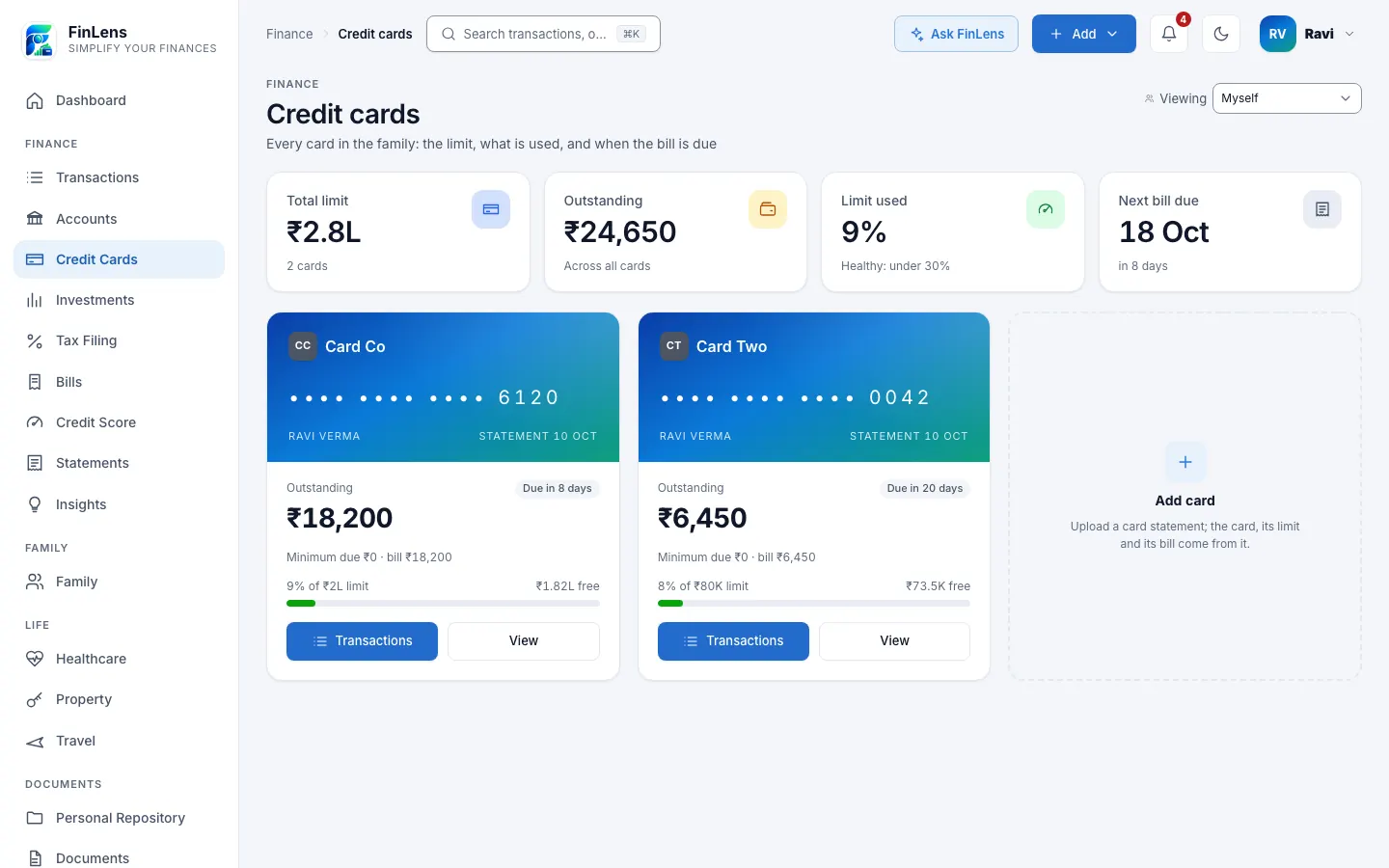
What the Credit Cards page in FinLens shows
Credit Cards is a page with every card you hold, with tabs for live, hidden and closed cards. Four figures sit at the top: Total limit, Outstanding across all cards, Limit used as a percentage, and Next bill due with the days left.
Each card then has a face of its own: the issuer's art, the last 4 digits, the amount outstanding, the minimum due and the open bill, a bar for the limit in use, and a tag such as Due today, Bill open or Paid. Transactions opens your transactions filtered to that card. View slides in a sheet with the limit, the statement date and the card's recent spends, and Details & settings lets you rename, hide, close or delete the card.
Why credit card bills are easy to lose track of
Two or three cards means two or three statement dates, due dates and minimum amounts every month, each in a different issuer's app and e-mail. A bill paid from another app may still look open, and a missed due date can bring a late fee and interest.
FinLens takes the bill from each statement, keeps the card's spends beside it, and shows every card on one page.
Who a credit card tracker helps
- People with cards from several issuers, or several cards from the same bank.
- Anyone who wants to see how much of each limit is in use before the statement closes.
- Members who pay bills through a third-party app and want the bill marked paid when the issuer confirms it.
- Couples who share a view of each other's cards through Family.
Practical uses of credit card bill tracking
See every due date together
Next bill due names the closest one, and each card's tag says whether its bill is open, due today, overdue or paid. The same bills appear on Bills with daily reminders.
Statements that must add up
For the monthly statements of HDFC Bank, ICICI Bank, Axis Bank, SBI Card and HSBC India, the rows must agree with the statement's own summary before anything is imported.
Limit used at a glance
A card's limit comes from its newest statement. The page marks use under 30% as healthy and says it is best kept under 30% when it is higher.
Several cards from one bank, kept apart
Transactions carry their card's last 4 digits, taken from the statement or the alert, so two cards from the same issuer keep their own spends, bills and limits.
Bill payments are not spending
The payment lines on a statement are listed as Bill payment and never counted as spending or income, so your monthly spend is not doubled.
How credit card bill tracking works in FinLens
Add a card from its statement
On Credit Cards, tap Add card. The Add Credit Card screen opens; choose the issuer or leave it to be detected, then upload the statement PDF.
The rules read the bill
FinLens reads the statement date, period, total due, minimum due, due date, the limit where printed, and every purchase, payment and charge. A locked PDF asks for its password once.
Name the card if the statement does not
If a statement prints no card number, FinLens asks Which card is this? and takes the last 4 digits. SBI Card prints only the last two, which are matched to your one SBI card ending in them.
Follow the card on the page
The card appears with its outstanding, minimum due and limit used. Its bill is listed under Bills, and a card statement detected notice gives the due date, with the amount on WhatsApp.
Let your mail keep it current (optional)
With Gmail connected, card spend alerts add transactions between statements, statement mails bring the next bill, and the issuer's payment confirmation marks the bill paid.
What you need to track your credit cards
- Credit card statement PDFs, from the issuer's website or app, or attached to its monthly e-mail.
- The statement's password, if FinLens's usual password shapes for that issuer do not open it.
- A card's last 4 digits, only when its statement does not print them.
- The total limit, for an issuer whose statements and alerts state only the available limit.
- Optionally, Gmail connected with read-only access, for spend alerts, statement mails and payment confirmations.
What FinLens reads from your card statements
- The bill: statement date, period, total due, minimum due, due date and, where printed, the credit limit.
- Every transaction: date, description, amount, whether it is a purchase, a payment or a refund, and a category decided by fixed rules.
- From spend alerts: the amount, the merchant, the date and the card's last 4 digits when the mail names them. An alert that names no card moves to the right card when that card's statement arrives.
- The card itself, saved with only the last 4 digits of its number, shown as •••• 1234.
- On the page: each card's outstanding, available amount, limit used, minimum due, bill status and recent spends.
Good to know about credit card tracking
- Dedicated readers with strict checks cover HDFC Bank, ICICI Bank, Axis Bank, SBI Card and HSBC India; Scapia and American Express have readers of their own, and IDFC FIRST Bank cards are read by a general reader.
- A card statement no reader can read is read once with AI help, your name and numbers swapped for placeholders and the provider asked not to store the answer, and the bill is imported only if its figures pass the same checks. A scan or photo has no text to mask, so it goes as it is.
- FinLens never files a statement under a guessed card: when the issuer cannot be named, you choose the bank on the document and retry.
- Some issuers' e-mails carry no amount; for those, add the bill by hand on Bills with Add bill.
- FinLens never pays a bill and never moves money. Check the amount and due date against the issuer's statement before you pay.
Questions about credit cards in FinLens
Which Indian credit cards can FinLens read?
HDFC Bank, ICICI Bank, Axis Bank, SBI Card, HSBC India, Scapia, American Express and IDFC FIRST Bank. A statement from any other issuer gets one masked reading with AI help and is imported only if it passes the checks.
How does FinLens know my due date?
It reads the due date, the total due and the minimum due from your card statement, uploaded or mailed. If a figure looks wrong, you can correct it in the bill's details on Bills.
Can FinLens pay my credit card bill?
No. FinLens shows what is due and reminds you; you pay through your bank or the issuer. When the issuer's payment confirmation reaches your connected Gmail, or when you tick the bill, it is marked paid.
Is my full card number saved?
No. Each card is saved with only the last 4 digits of its number, and FinLens never asks for the full number, the expiry date or the CVV. The statement file you upload is kept as you sent it, encrypted.
Why does my card say the limit is not known yet?
Some statements and alerts print only the available limit. Open the card's Details & settings, choose Manage and enter the total limit. When a statement prints the limit, the newest one sets it.
I have two cards from the same bank. Will they be mixed up?
No. Transactions carry the card's last 4 digits from the statement or the alert, so each card keeps its own spends and bill. Our guide to reading a credit card statement explains the figures on each bill.
Can I manage all my credit card statements in one place?
Yes. Every statement you upload, or that reaches a Gmail account you connected, is read for the card's outstanding, limit used, minimum due and due date, and each card gets its own tile; two cards from one bank are told apart by their last 4 digits, and reminders start a week before each due date.
Related features
Bills & reminders
Card and Jio bills with due dates, and a daily WhatsApp reminder from 7 days before each due date.
Learn moreBank accounts
Every account's balance and transactions, read from your bank statements and alerts, on one page.
Learn moreCredit score
Your score, its trend and every account on your Experian report, with its payment history.
Learn moreSpending insights
Every transaction in a category, with plain rules that flag spikes, dues and your savings rate.
Learn moreBring your whole financial picture into FinLens
FinLens is open by invitation. Ask for one with your name, mobile number and e-mail address, and a person reviews it; if you already have an account, sign in.
At present the Pro plan is free for your first year: claim it on Plan & Billing once you are in.
Or write to support@finlens.in.